Why is email encryption harder to popularize than HTTPS?
August 14, 2026
Please indicate when reprinting: Reprinted from ZoTrus CEO Blog)
Let's Encrypt launched in 2015, and through the ACME (Automatic Certificate Management Environment) protocol, it fully automated the application, validation, and renewal of SSL certificates. In just ten years, global HTTPS adoption surged from under 50% to over 95%. The red "Not Secure" warnings shown by browsers on HTTP sites created a powerful push on the user side.
Meanwhile, S/MIME email encryption technology was born in 1995, and its first formal standard, RFC 2311, was established in 1998, 21 years before ACME became RFC 8555 in 2019. Yet over two decades later, email encryption adoption remains strikingly low. A study covering 27 years and over 81 million emails found that only 5.46% of users had ever used encryption, and encrypted emails accounted for just 0.06%.
Both are encryption technologies. Why has email encryption been so much harder to popularize than HTTPS?
1. How did HTTPS succeed?
HTTPS adoption was driven by two forces: automation and UI warnings.
- On the automation: Let's Encrypt and the ACME protocol automated SSL certificate applications, validations, and renewals. Website administrators no longer needed to manually submit documents to CAs, validate domains, wait for approval, download certificates, or install them manually. The entire process became automated.
- On the UI warning: major browsers like Chrome, Edge, and Firefox display red "Not Secure" warnings on HTTP sites. When users see "Not Secure", over 90% will immediately leave the page due to security concerns. This visual warning made "not encrypted" unacceptable.
The results were immediate: technology made encryption zero-effort, and UI made unencrypted sites unacceptable.
2. Three barriers to S/MIME encryption adoption
Email encryption, despite S/MIME becoming a standard as early as 1998, has never gained traction. Three major barriers stand in the way:
- Barrier one: certificate application and configuration are extremely complex. Users must apply for an S/MIME certificate from a CA, verify their identity, download the certificate, and manually configure it in their email client. This process alone deters 99.99% of users.
- Barrier two: public key exchange is difficult. Before sending an encrypted email, the sender and recipient must exchange public key certificates in advance. This is essentially an "encryption preparation" step before the actual encrypted communication, significantly raising the barrier.
- Barrier three: key management is cumbersome. Certificates expire and require renewal. Switching devices means reconfiguration. Losing a private key means permanently losing access to all encrypted emails. These management burdens are too heavy for average users.
3. Why is email encryption harder to automate than HTTPS?
HTTPS and S/MIME both rely on PKI (Public Key Infrastructure), but the difficulty of automation is on a completely different scale:
- Different subjects. SSL certificates need to be configured once on the server side, with a single certificate serving all users of a website. S/MIME certificates, however, involve every individual email user, making adoption exponentially harder.
- Different ecosystems. Websites have a unified web server ecosystem, allowing the ACME protocol to integrate in a standardized way. Email, by contrast, involves countless clients and devices with poor interoperability.
- Different awareness. Users lack awareness that email is sent in plaintext. For over two decades, people have grown accustomed to discussing contracts, sharing financial statements, and exchanging personal information over email, rarely realizing that this content is effectively exposed on the network.
4. UI warnings: the final push for HTTPS
The most critical driver of HTTPS adoption may not have been technology itself, but the "Not Secure" warnings in browser UIs.
When users saw the red "Not Secure" label in the address bar, their first reaction was caution and avoidance. This visual warning turned encryption from a technical option into a user expectation. Website owners, eager not to lose visitors, had no choice but to deploy SSL certificates as quickly as possible.
But email clients have been absent on this front. Traditional email clients offer no visual warnings for unencrypted emails. Users have received plaintext emails for their entire lives without ever seeing a "Not Secure" reminder, so they have had no motivation to change.
5. ZTmail: automated encryption and visible security
ZTmail is designed to address both automation and visualization.
On the automation, drawing on the success of the ACME protocol, ZTmail automates certificate management:
- Automated certificate provisioning: Based on RFC8823, users click "Apply for Certificate" in Settings, and the system automatically applies for and configures an RSA S/MIME certificate. Users with national cryptographic compliance needs can optionally apply for SM2 certificates. Keys are generated locally, and private keys never leave the user's device.
- Automated public key exchange: When sending an encrypted email, the system automatically queries the certificate directory service to retrieve the recipient's public key certificate. No manual key exchange is required.
- Automated key management: Keys are generated and stored locally, supporting one-click encrypted export, import, and restoration to and from the user's own mailbox. Users manage their keys independently.
On the visualization, ZTmail takes inspiration from browser's "Not Secure" warning mechanism and introduces an innovative UI in the email client.
- If an email has a digital signature but only validates the mailbox (MV), it shows a T1 icon. With individual validation (IV), it shows a T2 icon and the sender's name. With organization validation (OV), it shows a T3 icon and the organization name. With sponsor validation (SV), it shows a T4 icon, along with the sender's name and their organization.




- Any email without a digital signature displays a warning exclamation mark and a black unlocked padlock icon, indicating that the email has no digital signature and is not encrypted, alerting the user to question the sender's identity. If the sender address in the email header does not match the address bound to the certificate, a warning exclamation mark appears next to the sender address. If the digital signature validation fails, a warning displays: "The digital signature is invalid. The email content has been tampered with!" If the signing certificate expires, a yellow signature icon with the message "Signer's certificate has expired" displays.


- Users can click the encryption icon displays "This message was encrypted." Clicking the digital signature icon displays "Signature valid, content not altered. Certificate chain is trusted".
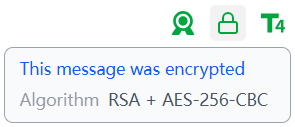
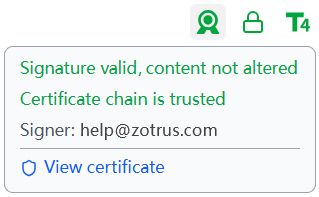
The logic of this UI system is clear: emails without encryption and signatures are immediately visible as "Not Secure"; emails with encryption and signatures clearly display the sender's validated identity level. Just as browsers used the "Not Secure" warning to push websites toward HTTPS adoption, ZTmail makes email security visible through intuitive visual cues.
Let every insecure email be exposed. Let every secure email show its identity.
6. Popularizing email encryption also urgently needs automation
The success of HTTPS proves one truth: encryption cannot be popularized through users' self-learning alone. It requires automation and making "not encrypted" unacceptable.
What HTTPS has achieved today is where S/MIME can reach tomorrow. ZTmail's goal is to make email encryption as seamless and default as HTTPS, fully automated on the technology side, and visually clear on the user side.
When every unencrypted email displays a "Not Secure" warning, and every encrypted email clearly shows the sender's validated identity, the adoption of email encryption will no longer be a technological problem. It will be a matter of time.
Free automated provisioning of S/MIME certificates. Automated end-to-end email encryption. Removing the barriers to encrypted email for everyone.
Browsers popularized HTTPS. ZTmail will popularize S/MIME. Two paths, one answer: automation.